What CrewLineCRM does not do
Every line here is a limit that exists today, and most are limits the product states on its own screens. Read them now rather than in month two.
CrewLineCRM is new: no customer count to quote, no rating, no case study. The only useful thing to offer is an exact account of where it stops. What it does do is a separate page.
Does CrewLineCRM process my customers' card payments?
No. CrewLineCRM records a payment against an invoice — card, cash, check or anything else — and never moves the money. Taking the card still happens wherever you take it today.
The Checkout action produces a clearly labeled simulation page, not a payment page, and there is no payment link to send. Recurring plans are tracked and cancellable; no card is charged. CrewLineCRM therefore takes no percentage of your money, and has no reason to prefer one processor over another.
Does CrewLineCRM file and pay my payroll taxes?
No. CrewLineCRM calculates them and keeps the records. Filing the returns and remitting the money to the IRS and to the State of Nevada stays with you, by their deadlines.
The arithmetic is real: federal withholding by the IRS Publication 15-T percentage method, FICA, Nevada Modified Business Tax at 1.17% over a $50,000 quarterly exemption, UI and the CEP surcharge. The product prints that disclaimer on every payroll tax screen, and flags its own 2026 Nevada wage base as worth re-confirming.
Does CrewLineCRM calculate overtime?
No. Payroll in CrewLineCRM is straight time only — hours times rate, with no time-and-a-half at 40 hours and no daily overtime rule.
The product says so in its own payroll disclaimer rather than letting you find it on a Friday. A shop that works long weeks adjusts every run by hand, or runs payroll elsewhere.
Does CrewLineCRM handle sales tax outside Nevada?
No. CrewLineCRM ships sales tax for 17 Nevada counties and nothing else, and it computes no state income-tax withholding for any state at all.
Inside Nevada the decision engine is genuine: a real-property improvement collects $0, labor-only collects $0, and only parts and materials on a retail sale are taxed, each with the reason shown. Collected tax accrues to a liability account; remitting it is not modeled. Employer payroll tax is Nevada-only too.
Does CrewLineCRM work offline?
No. CrewLineCRM needs a connection. There is no service worker, no web app manifest and no offline cache in it — an ordinary browser application, not a progressive web app.
Nothing queues up in a canyon and syncs later. If your crews work where there is no service, weigh that before you move your schedule in.
Is there a mobile app?
No. There is nothing to download. CrewLineCRM is responsive web only — nothing in the App Store, nothing on Google Play, no home-screen install.
The layout does adapt to a phone, and the same login works in the truck. The calendar's Month tab is hidden below 768 pixels wide, because a month grid on a phone is unreadable.
Can I drag jobs around the schedule?
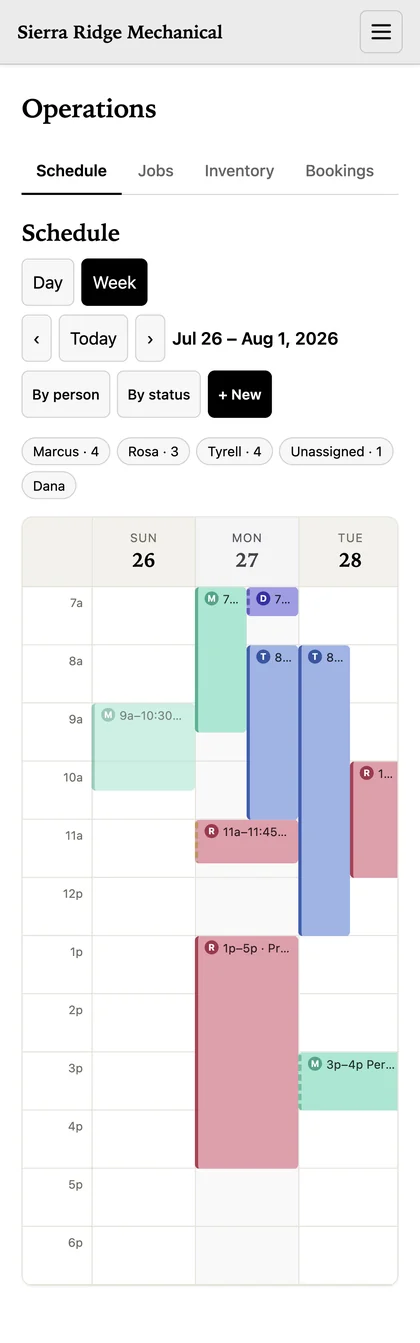
No. The calendar has no drag interaction at all. Exactly one board in CrewLineCRM drags — the six-column jobs board, where the drop commits a real status change — and that drag needs a mouse or trackpad. On a phone it does not work: you open the card and change its status, which does the same thing in one more tap.
To move a job on the calendar you open it and change the time. The leads pipeline is the board most often mistaken for the jobs board: it looks like a kanban, but each card carries a dropdown that moves the deal to another stage.
Can I export all my data?
No. Five things export to CSV: customers, leads, contacts, reviews and a manifest of your files. Everything else has no export at all.
What has no export: invoices, payments, recurring plans, expenses, payroll, the books, staff, timesheets, time off, jobs, the schedule, inventory, bookings, contracts and activities. The files export is metadata only, never the bytes. Export is owner and accountant only — a manager cannot run it.
What happens to your data — separation, export and backups.
Can CrewLineCRM import from QuickBooks or my old CRM?
No. Import is CSV only, and only for customers and inventory. There is no connector to QuickBooks, Jobber, ServiceTitan or any other product, and no one-click migration.
The importer that exists is careful — a dry run that writes nothing, auto-mapped headers, a typed confirmation. But it is two entities, from a spreadsheet. Invoices, jobs and years of history are typed in or left behind.
Do invoices go out as PDFs?
No. An invoice is emailed as plain text. CrewLineCRM generates no PDF at all — no branded template, no attachment, no print-ready document.
The recipient, subject, body and amount are all derived by the server from the stored invoice. If your customers expect a document, you will be pasting the figures into your own template.
Can a customer sign a contract online?
No. CrewLineCRM records that a contract was signed; it does not capture a signature. A user moves the status themselves and the server stamps the time.
A contract holds a title, a value, a status, an expiry and notes. There is no signing link to send, no signature pad and no e-signature integration of any kind. Whatever you use today to get a name on a document, you keep using.
Does CrewLineCRM collect reviews from Google?
No. Reviews in CrewLineCRM are records you type in yourself. There is no Google or Yelp connection, nothing asks a customer for a review, and nothing imports one.
You get somewhere to keep the rating, the source and your reply: a record of your reputation, not a machine for building one. If review volume is why you are shopping, buy a tool built for it.
Is there two-factor authentication or a password reset link?
No, to both. CrewLineCRM has no two-factor authentication of any kind and no self-service password reset — a locked-out account is recovered by an operator, by hand.
The security that is real sits underneath the login: your company's rows are separated in PostgreSQL itself by row-level security, forced on every tenant table, and four roles run on a default-deny matrix the server refuses to start without. Multi-factor is not part of it, so a customer's security review that requires MFA is one CrewLineCRM fails.
Can I delete a batch of old records at once?
No. There is no bulk delete anywhere in CrewLineCRM. Archiving is the only cleanup path, and it works one record at a time.
Hard delete on a client is owner-only, and vendors have no delete route at all. That is deliberate — the audit trail is append-only, and books stop reconciling when money records vanish in batches. It is also slow.
Is there a phone system?
No. No plan you can buy includes the calls module — it was withdrawn from Pro, Business and Custom alike.
Where it runs at all it is narrow: one tracked number rings through to one nominated phone, and the log carries metadata only. There is no phone tree, no auto-attendant, no voicemail, no recording and no transcription. None of it has ever existed. Do not buy this for the phones.
Can I sign up without talking to anyone?
No. Access to CrewLineCRM is by request — you fill in a form and a person reads it. There is no card to enter and no trial clock counting down.
The reason is that a person imports your customer list and sets up your rates before you rely on it. An account that nobody set up is an account holding a half-built picture of your business, and you would find that out in the middle of a job rather than on day one. Seats are then a hard cap — 10 on Pro, 25 on Business, 100 on Custom.
The pricing page has the bands and the prices.
What will this site never claim?
No customer count, no star rating, no testimonial, no case study, no logo wall and no uptime figure. CrewLineCRM has none of those yet, and inventing them would be the cheapest lie available.
Support response times and accessibility conformance are the same: nothing here substantiates a number, so no number appears. What is here is checkable now: the price is on the pricing page rather than quoted on a call, the limits are on this one, and the screenshots are the real product with a demonstration company's data. The FAQ answers the narrower questions.
Who should buy something else?
Anyone whose business runs through one of the gaps above. Six of them end the conversation on their own, and it is cheaper to find that out here.
- Your crew works overtime. Straight time only is a gap you would paper over every run.
- You need sales tax outside Nevada, or state withholding anywhere. Seventeen Nevada counties is the whole of it.
- You want customers paying by card from the invoice. Payments here are recorded, never processed.
- Your people work where there is no signal. No offline mode, and no app to hold the work.
- You are migrating years of invoices and jobs. CSV, customers and inventory, and that is all.
- You need PDF invoices, e-signature, review syncing, a phone system or two-factor authentication. None of the five exists.
CrewLineCRM suits a contractor with a crew — most cleanly one working in Nevada, since that is where the tax modules apply — who wants the schedule, the customers, the jobs and the money in one place at one price, and who has the items above handled elsewhere. If that is not you, this is not the right software, and it is worth more to us to say so here than to sell you a month of it.